
How to Describe a Business Process Using a Drakon Flowchart
Steps of Visual Business Process Modeling
- Come up with a name that reflects the goal of the business process.
- Identify the actors of the business process.
- Determine the resources required for the process.
- Determine the measurable outcome of the process.
- Define the trigger conditions of the process.
- Break the process into steps: actions and decisions.
- There must be only one end.
- Use a silhouette for complex processes.
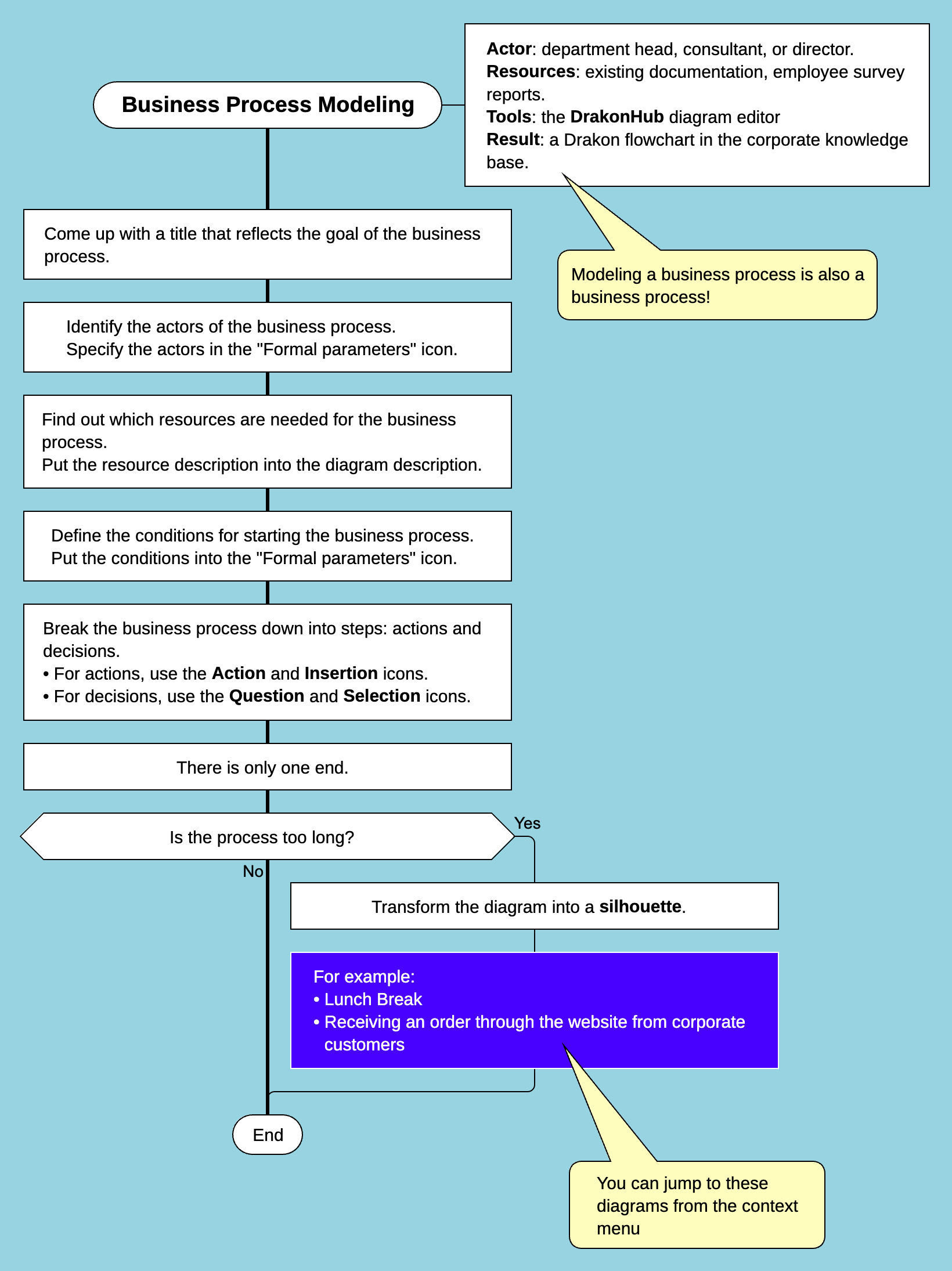
Example of a business process represented with a Drakon flowchart
1. Come up with a name that reflects the goal of the business process
The name of a business process is its first and most important element.
It must be clear, understandable, and reflect the main goal of the process.
When choosing a name, consider the following principles:
- The name should be informative. It should describe what the process does. For example, "Processing a supply request" is better than simply "Request".
- It should not be too short. Short names can be unclear. For example, "Registration" is too general, while "New customer registration" is more specific.
- It should not be too long. Long names are hard to read. For example, "The process of registering a customer when they contact the company for the first time" is too detailed—better to simplify it to "New customer registration".
- The name should be placed correctly. In Drakon flowcharts, it is placed in the top-left corner.
- The name should match the goal of the process. If the process is aimed at achieving a specific task, it should be reflected in the name.
Example of a good name:
- ✅ "Placing an order on the website"
Bad examples:
- ❌ "Process" (too general)
- ❌ "Creating a product order request by a customer through an e-commerce interface" (too long)
2. Identify the participants of the business process
A business process is always carried out by specific participants.
These participants can be internal (company employees) and external (customers, contractors, partners). Participants are sometimes called actors.
Basic rules:
- Each step must have a responsible actor. There should be no actions without an assigned actor.
- Actors can vary. They may be employees (managers, operators), automated systems (e.g., CRM), customers, or external contractors.
- Actor information is recorded in the diagram. In Drakon, actors are specified in the "Formal parameters" icon next to the title.
- If there are multiple actors, indicate roles in each step. For example, "Confirm order" is performed by the customer, while "Send invoice" is performed by a manager.
Example:
- Customer fills out a request.
- Manager reviews the request.
- Warehouse employee ships the product.
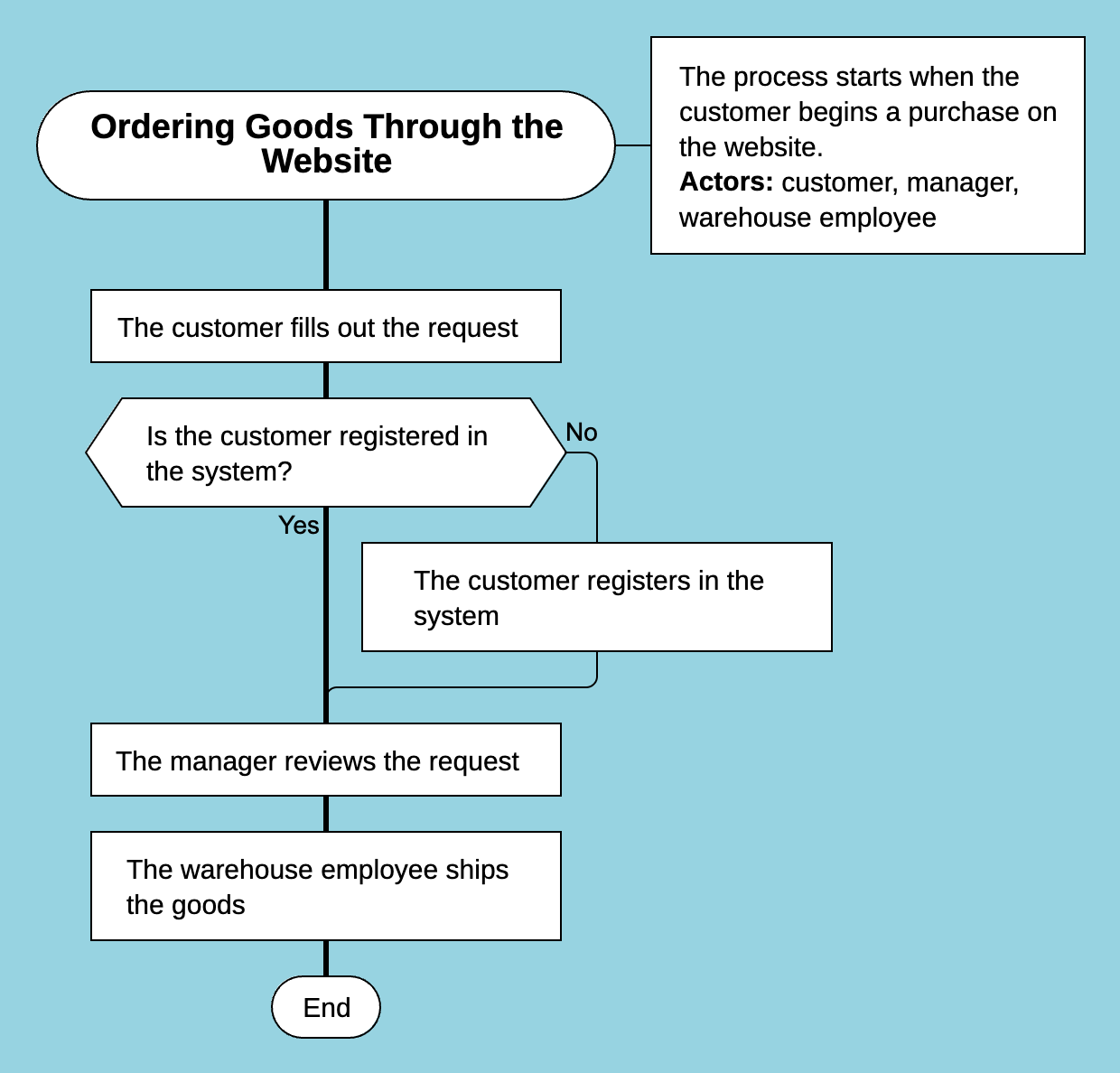
Example of a business process with multiple actors
Each step has a clear actor, making the process understandable for those who will perform it.
3. Determine the resources required for the business process
Each action in a business process requires certain resources:
- Information (e.g., customer data, order details)
- Equipment (e.g., computer, scanner)
- Tools (e.g., hammer, pot, data processing software, CRM system)
How to identify resources:
- Go through each step and record required resources.
- Combine them into a single list.
- Place the list in the diagram description.
Example:
- For customer registration: customer form, CRM database, internet access.
- For order processing: accounting system, available inventory.
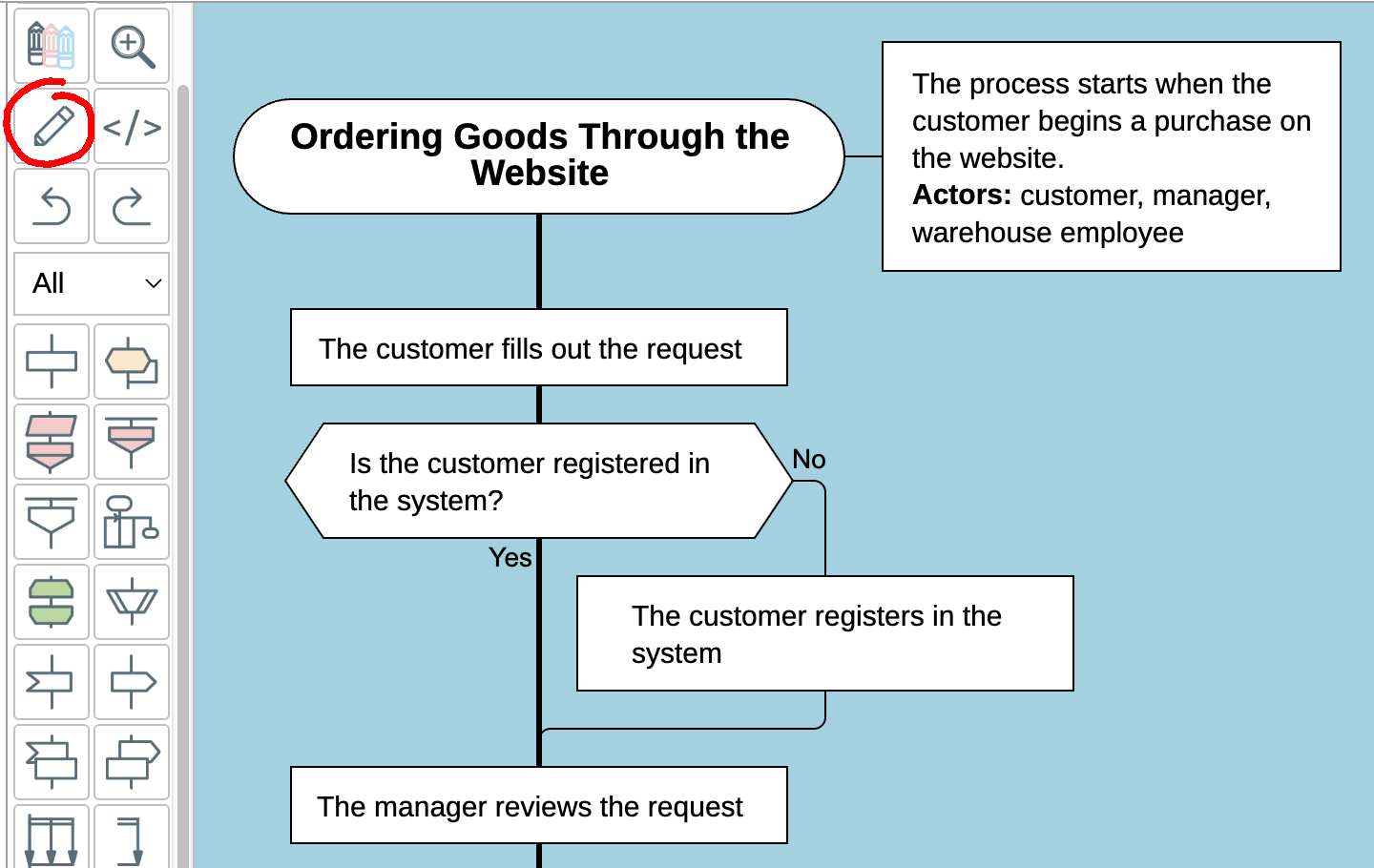
Diagram description in DrakonHub
The more precise the resource description, the easier it is to understand what is needed.
4. Determine the measurable outcome of the process
Сlearly define what “success” looks like for this business process. Use objective, verifiable terms.
Identify the specific result the process must produce—such as a completed order, a verified payment, or a resolved support request.
Then, attach measurable criteria to it. These may include quantity (how many), time (how fast), quality (error rate), or cost.
The outcome should be easy to observe so that anyone can tell whether the process achieved its goal.
5. Define trigger conditions for the business process
A business process does not start on its own—it begins under certain conditions.
It is important to clearly define when the process starts.
How to define triggers:
- Answer: what must happen for the process to begin?
- Record the conditions in the "Formal parameters" icon.
Examples:
- "Order processing" starts when a customer places an order.
- "Payment verification" starts when a payment is received.
- "Feed the cat" starts when the cat shows up and demands food.
Clearly defined triggers help understand when the process begins and what activates it.
6. Break the process into steps: actions and decisions
A business process must be divided into clear, logical steps.
Each step is either an action or a decision. Do not mix them in one step.
Drakon also includes other expressive elements (events, pauses, durations, loops, parallel processes), but they all support the main structure: actions and decisions.
Rules for actions
An action is a specific instruction of what to do.
It is represented by the "Action" icon.
Follow the principle: one action — one step.
If multiple actions are combined, understanding becomes harder.
Instead of "Open the form and enter data", split into:
- Open the form.
- Enter data.
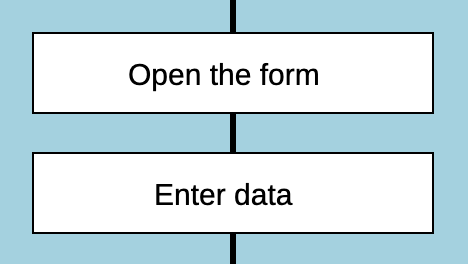
Multiple "Action" icons
Action icons must contain commands. Avoid single nouns like "Database" or "Invoice".
Instead write: "Save customer data to database", "Send invoice to customer".
If a step calls another process, use the "Insertion" icon instead of "Action".
It indicates execution of a separate diagram.
Rules for decisions
A decision is a choice based on conditions.
It is expressed as a question.
For yes/no questions, use the "Question" icon.
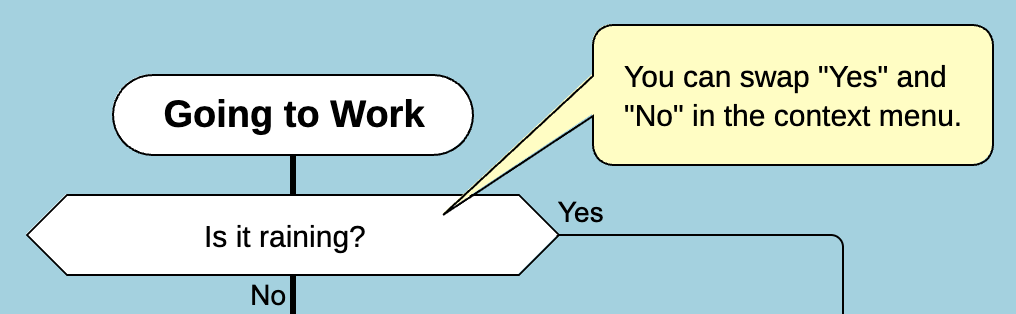
"Question" icon
Rules:
- Preferred/likely path goes downward.
- Less likely/unwanted path goes to the right.
This is the "the further right, the worse" rule.
To swap Yes/No, right-click and choose Swap Yes and No.
For multiple outcomes, use the "Choice" icon with "Case" branches.
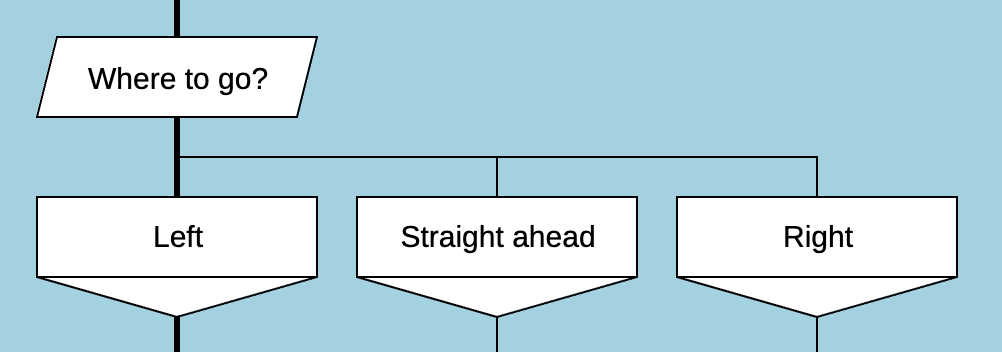
"Choice" icon with cases
Arrange cases so the most likely are on the left.
If needed, add a final "other cases" branch on the right.
Combining actions and decisions
A correct process is logical:
- Decisions lead to different actions.
- Actions follow a sequence.
Example:
Question: "Does the user have an account?"
- Yes → "System Login"
- No → "Register new user"
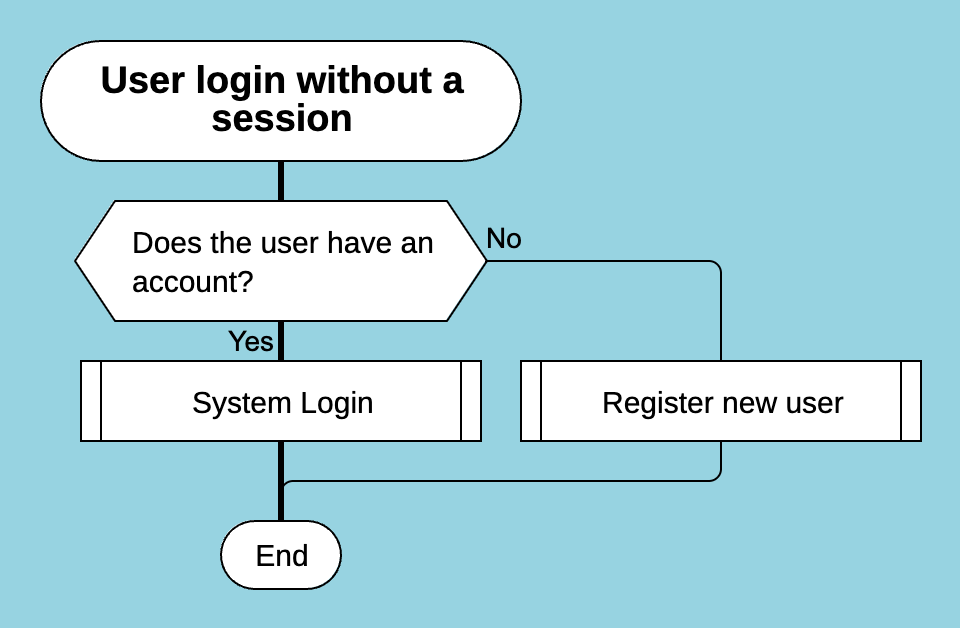
"Question" and "Insertion" icons
Action: "Request login and password"
Question: "Is the password correct?"
- Yes → "Open the personal account"
- No → "Login error"
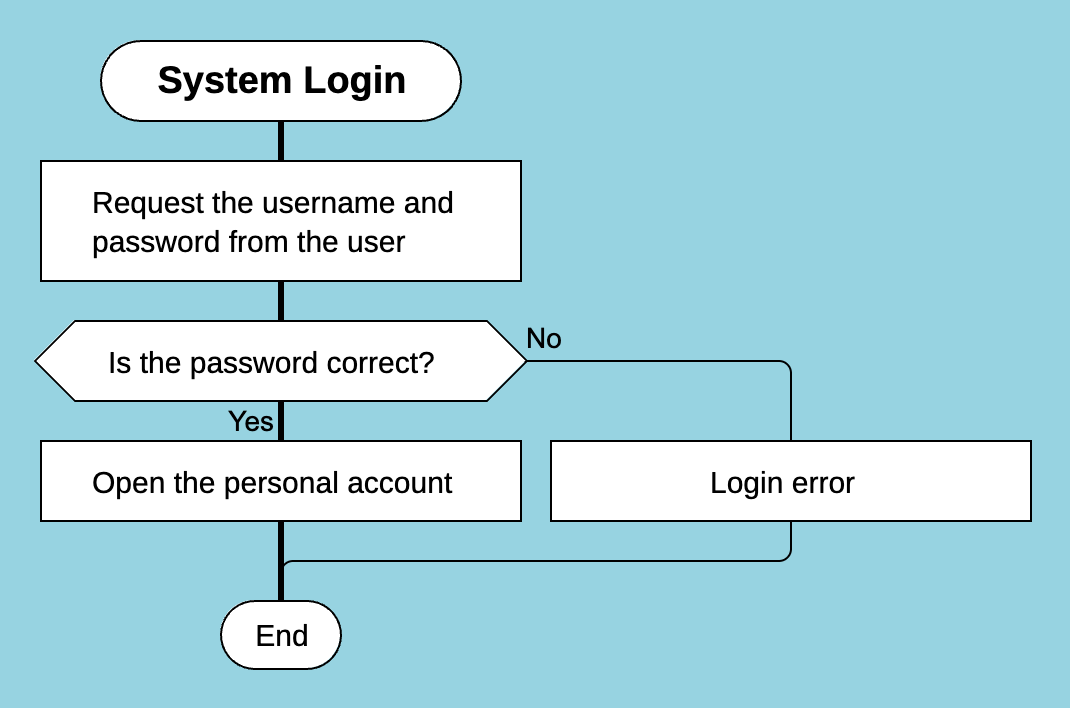
"Question" and "Action" icons
Each step clearly defines either an action or a decision.
7. There must be only one end
Every business process must end at a single final point, marked with the "End" icon.
Rules:
- Only one "End" icon is allowed.
- The process must always end explicitly.
- You cannot replace the end with the name of another process.
Correct example:
- Customer places order.
- Assemble order.
- Deliver order.
- End.
Incorrect:
- ❌ "After placing an order, delivery starts" (no explicit end)
8. Use a silhouette for complex processes
If the diagram is too long vertically, convert it into a silhouette.
A silhouette divides the process into logical parts.
It answers three key questions:
- What is the process called?
- How many parts does it have?
- What are those parts called?
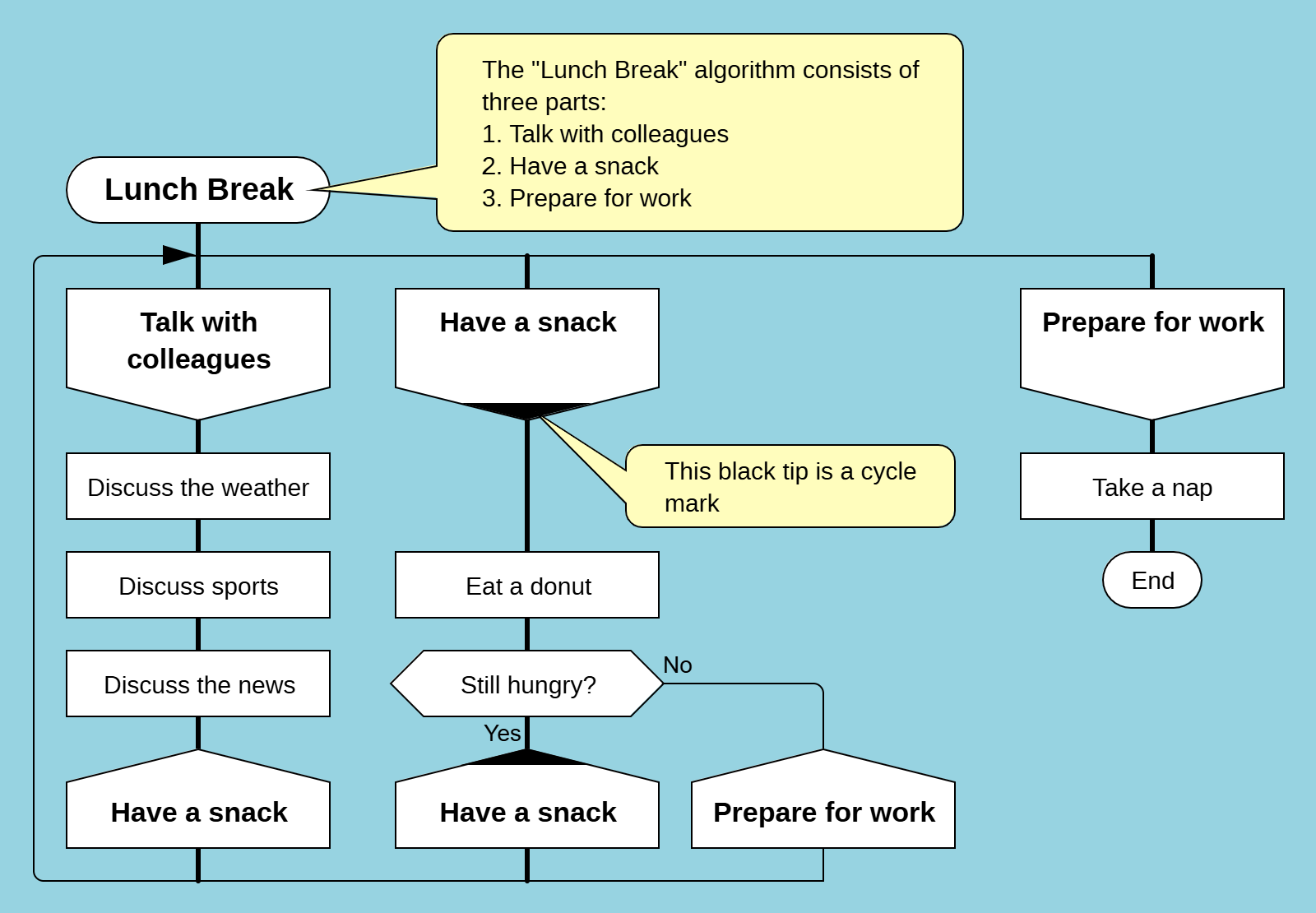
Example of a silhouette Drakon flowchart
Example:
- Process: "Lunch break"
- Parts: three
- Names: "Chat with colleagues", "Eat", "Prepare for work"
How to use:
- Identify main stages.
- Turn them into branches.
- Arrange left to right.
Conclusion
A business process is a clearly defined set of steps aimed at achieving a goal.
These steps are performed by actors, who are the main users of process diagrams.
Steps are of two types: actions and decisions.
- Actions → instructions (Action, Call icons)
- Decisions → questions and responses (Question, Choice icons)
The clearer the steps, the more efficient the business.