
How DrakonHub Helps You Create Algorithms
Graphics Are Better Than Text
A flowchart shows a process unambiguously, without room for interpretation. You can trace every path through the algorithm with your finger—and that advantage is hard to argue with.
When you need to explain to a programmer how a program should work, draw a diagram. Don’t write essays, don’t force them to read text. Reading technical text is exhausting work.
Instead, create a blueprint of the algorithm. Why should programmers be any worse off than engineers and architects? Programmers are people too—they deserve a graphical representation of professional information.
Disorder in Diagrams Destroys Their Advantages
Flowcharts are often disorganized, and that’s a problem. Where there is no order, there is chaos. Chaos blocks understanding.
The lack of organizing principles leads to confusing, hard-to-read diagrams. Sometimes you look at a diagram and see such a tangle of arrows and boxes that your hair stands on end.
Of course, there are people who know how to draw well. Their flowcharts turn out clear and understandable. But if you don’t have artistic talent—trouble awaits. There is a high risk that the advantages of graphics will be lost.
Drakon Is Structured Flowcharts
To fight chaos in diagrams, engineers from the aerospace industry, led by V. D. Parondzhanov, created the Drakon visual language. They developed “traffic rules” for flowcharts. These rules minimize the risk of collisions between graphical elements. The rules bring order, making diagrams easier to read.
Thanks to Drakon, anyone can draw a clear algorithm diagram—even without artistic training.
Figure 1 shows two diagrams. They represent the same algorithm but in different ways. On the left is a regular, unstructured flowchart. On the right is a Drakon diagram.
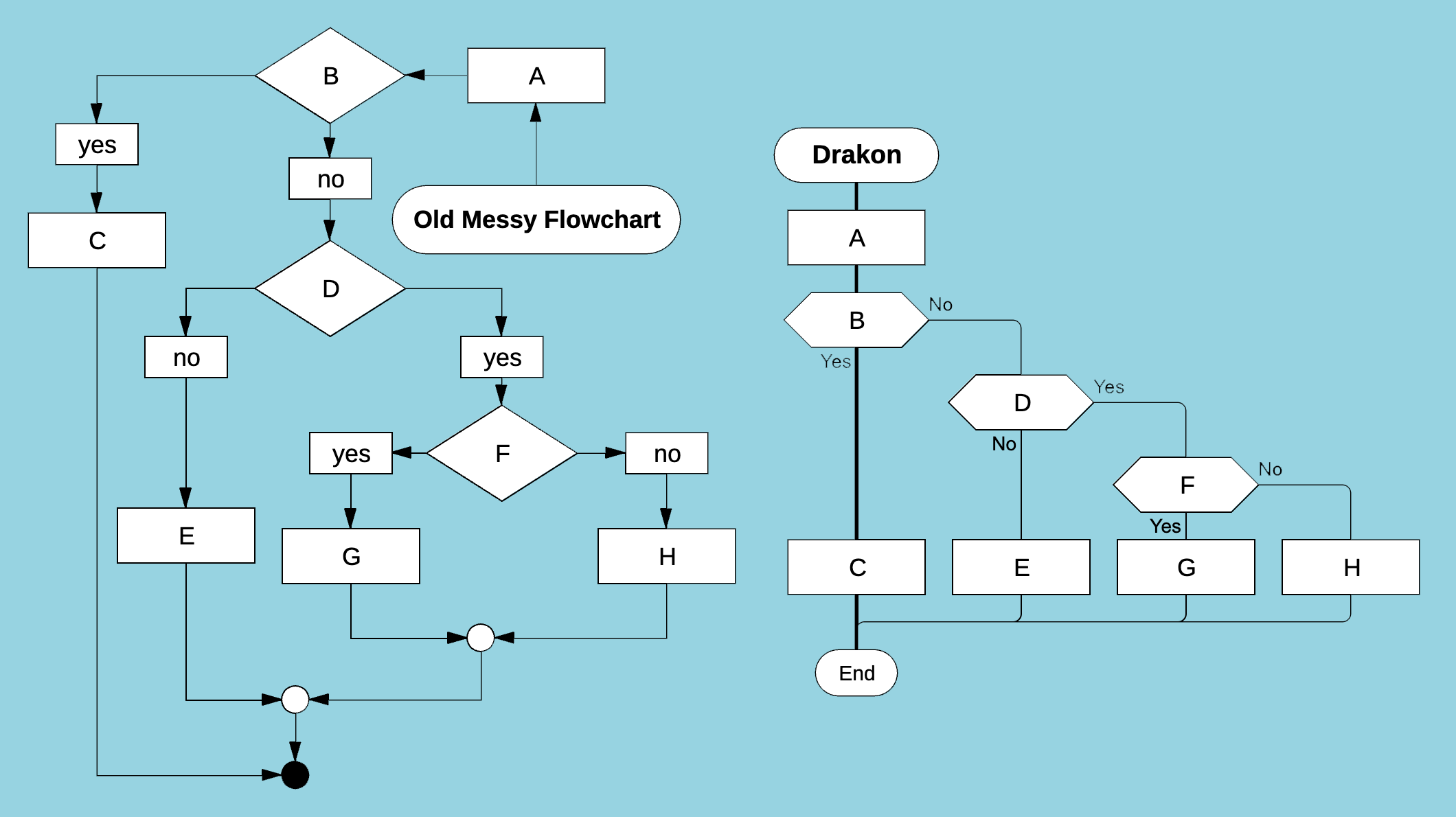
Even in a simple example, a well-structured Drakon diagram is clearer than a messy traditional flowchart.
Visual Clarity
The rules of the Drakon language are aimed at achieving visual clarity. Examples include: no crossing lines, no curved or diagonal lines, equal spacing between elements, and consistent element widths.
Thanks to these rules, Drakon diagrams look clean and strict—without visual noise.
Consistency and Predictability
Visual clarity is important, but consistency is even more important.
When you first look at a traditional flowchart, you have to spend time understanding its structure—where it starts and how the logic flows. To follow the logic, you must trace arrows from one element to another.
With Drakon diagrams, it’s easier. Their structure is always the same. The start is always in the top-left corner, the next element is directly below, branching goes only to the right, and so on. There’s no need to “scan” the diagram beforehand—you can immediately focus on the algorithm itself.
Consistency creates predictability, and predictability makes understanding easier.
A Good Drakon Editor Follows the Rules for You
Drakon diagrams look minimalist and are easy to understand. This is achieved through carefully designed rules that were refined with real users.
There are many such rules, but when working in DrakonHub, you don’t need to know them. DrakonHub knows the rules and enforces them automatically.
Your diagrams will always follow the Drakon standard.
Speed of Diagram Creation in DrakonHub
Drakon diagrams are difficult to draw in general-purpose diagram editors. Even if you know the rules by heart, the process is slow. Too much has to be done manually: positioning elements, connecting them, adjusting layout. Inserting an element into the middle of a diagram is even worse—you have to move everything around to make space. This requires endless patience. Editors sometimes feel like they are deliberately frustrating the user. No matter how hard you try, you can’t place an element exactly where you want it—slightly left, slightly right, but never just right. This is called “pixel hunting.”
There is no pixel hunting in DrakonHub. DrakonHub is designed for speed. With a single mouse click, it performs multiple actions at once: inserting an element, connecting it to neighbors, aligning elements, creating space in the diagram, and more (see Fig. 2). No matter what the user does, the logical integrity of the diagram is preserved.
DrakonHub simplifies algorithm creation so much that it changes the approach to documentation itself. Now drawing is faster than writing text, so you can afford to create many diagrams. In traditional editors, we treat each diagram like a work of art. In DrakonHub, you can create as many diagrams as you want.
Conclusions
- Avoid text. Draw diagrams instead.
- Disorganized flowcharts create chaos that hinders understanding.
- The Drakon language eliminates chaos in diagrams.
- Drakon diagrams are predictable and therefore easy to read.
- The fastest way to create algorithms is with a specialized editor like DrakonHub.